Guide to the “Peak Settings Editor”
Sokora’s state-of-the-art settings menu (formally called "Peak Settings Editor", or PSE) can be confusing at first, since instead of taking command arguments or redirecting to a web dashboard, it shows a container with the current settings and a ton of toggles. This container is interactive and is the way you’re supposed to edit settings (faster and easier than most bots!)
🔰 • PSE at a basic level
Most settings should be clear to understand.
- Boolean settings (like
Enabledin certain categories) appear as a button that shows current status. Clicking it inverts it (i.e. disables what is enabled and vice versa). - Channel, role or select settings show a Discord-native select menu.
- Text or numeric settings wield an button, hitting it opens a Modal where you can see the current value and overwrite it if you wish.
/help has an interactive example!
If you hop on Discord right now and run /help settings, this section will have an interactive demo you can play with without changing actual settings. Highly recommended!
Changes apply instantly whenever you touch something. If you fear accidental changes, enable settings logging via /settings moderation so you have a history of changes.
🗃️ • OBJECT-type settings
Some settings (so-called OBJECTS) are nested. They wield an button instead of an one, after which two things can be found depending on whether it is a "static object" (merely an object) or an "iterable object" (a list of multiple objects):
- For static objects: A view similar to that of PSE, but with the specific settings of the OBJECT (an "object view").
- For iterable objects: A list ("iterable view"; or a message telling you the list is empty), with entries wielding another "Open" button that takes you to this object’s object view.
See these images:
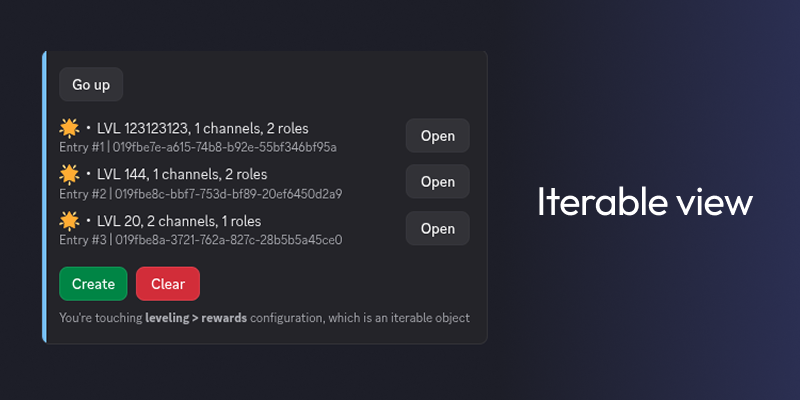
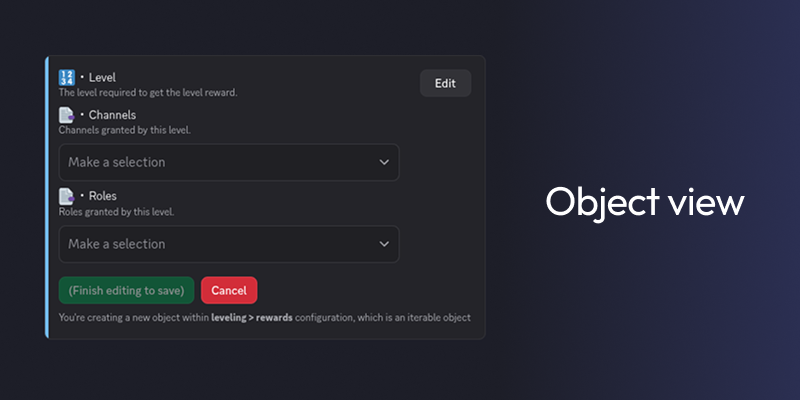
Unlike regular PSE views, object views have a button to apply changes. Other than that, object views behave nearly the same.
Iterable objects give you a list where each entry is given a label specific to the setting (e.g., leveling.rewards shows the level, channels and roles of each object in the main label). A tinier label below shows lesser important (but useful for power users) information: object index in the list and its GUID. These two don’t have a use-case yet but will have one in future releases.
The way they’re sorted is also setting-dependent (e.g., leveling.rewards sorts by level).
🔄 • Resetting or deleting data
There’s a button that shows up at the bottom of every PSE view whenever a setting has diverged from its default value. Clicking it opens a resetting view where all changed settings have a button to their right.
Selecting a setting marks it for reset whenever you click the button below. Next to it there’s also a button to just wipe the entire category, and a button to go back.
Iterable views instead only have a button that directly deletes every object within the iterable. Open objects to delete them individually.
In all cases, hitting reset will show a confirmation dialog to double-check if you really want to reset anything.
📥 • Settings logging
From moderation.events (assuming moderation.channel is set) you can enable an event called "settings". When enabled, any settings change will be logged to the designated channel, allowing to check what the previous value was and optionally revert it yourself.
Regular settings are logged in a simple before/after format, and using raw IDs for things like channels or roles (which is more convenient for later restoration).
OBJECT settings are logged using text in a format similar to YAML, and using a "diff" where instead of showing the before and after, just one text block is shown highlighting in red what was removed and in green what was added in place.